Call Us: +91 95668 50217


Query Form
Computer Courses
Special Courses
TALLY PRIME
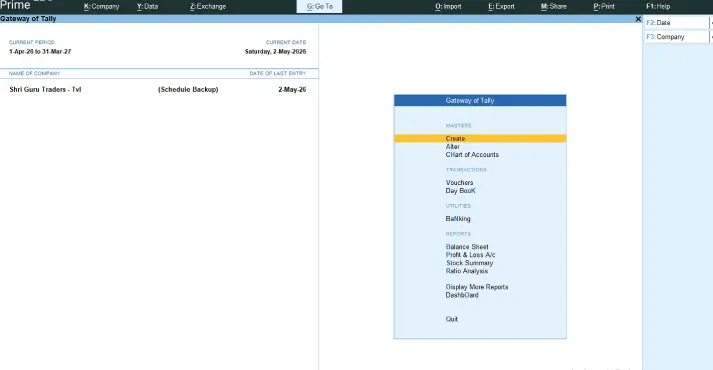
Tally Prime
Accounting Software
Shri Guru Educations is a premier training institute dedicated to delivering high-quality accounting education tailored to modern industry needs. Established to meet the growing demand across accounting departments, we provide specialized skill development and career guidance for key roles such as Account Executive, GST Account Assistant, and Tally Executive—complete with lifetime access to learning resources.
Why Choose this Course?
Why Learn TallyPrime Today?
- Useful for Accounting Jobs: TallyPrime is widely used for accounting and business work.
- Better Job Opportunities: TallyPrime skills can help you apply for accounting and finance-related jobs.
- In-Demand Skill: Many businesses need people who know TallyPrime and accounting.
- Learn GST & Tax: Understand GST, tax, invoicing, and other basic tax work.
- Practical Accounting Skills: Learn how to create companies, maintain ledgers, record transactions, manage stock, and prepare reports.
- Useful in Many Industries: TallyPrime is used in trading, retail, manufacturing, services, healthcare, IT, and many other businesses.
- Helpful for Business Owners: Learn to manage accounts, income, expenses, cash flow, and business reports.
- Easy to Learn: TallyPrime is beginner-friendly and can be learned step by step.
- Learn Through Practice: Get practical training to build confidence in using TallyPrime for real-world accounting work.
Why Learn TallyPrime at SGE?
- Practical, hands-on training on TallyPrime and live GST filing
- Expert-designed curriculum covering real-world business scenarios
- Prepares you for roles like Account Executive, GST Assistant & Tally Executive
- Dedicated placement guidance and job search support
- 100% practical computer lab access with 1-on-1 mentor guidance
- Affordable course fees with easy installment options
- Convenient campus in KTC Nagar with flexible batch timings
TallyPrime Course Details
Study Plan
- Basics of Commerce & Accounting
- TallyPrime Concepts
- Payroll
- GST
- GST Filling
TallyPrime Course Syllabus
Module -1: Basics of Commerce & Accounting
- What is Commerce?
- What is Accounting &
- Why Do We Need It
- Double Entry System
- Step-Structure
- Golden Rules of Accounts
- Importance of Accounting
- Bookkeeping vs Accounting
- Basic Terms Used in Accounting
- Accounting Standards
Module -2: Manual Accounting
- The 3 Step Journalizing Method
- Steps to Find Journal, Ledger, Trial Balance by Manually
- Steps to Find Final Accounts – Trading A/c, Profit & Loss A/c, Balance Sheet by Manually.
Module -3: Tally Prime Basics
- Overview on Tally: History, Advantages, Releases
- Create Your First Company
- Create, Alter, Shut, Delete, Default Loading Company
- TallyPrime: Predefined Vouchers
- Essentials for Passing Vouchers
- Traditional Recording Vs Smart Recording
- Tally Prime Single Entry Vs Double Entry
Module -4: Basic Business Transactions in TallyPrime
- Understanding Business Transactions
- Creating Accounting & Inventory Masters
- Recording Purchase & Sales Transactions
- Recording Payment & Receipt Transactions
- Recording Contra Transactions
- Recording Capital & Drawings Transactions
- Recording Settlement with Discount
- Recording Fixed Asset & Depreciation Transactions
- Practical Exercise
- Checking Accounting Reports
Module -5: Credit Limit
- Understanding Credit Limit & Credit Period
- Setting Credit Limit for Customer Ledger
- Recording Credit Sales
- Recording Receipts Against Outstanding
- Monitoring Customer Outstanding
- Handling Credit Limit Warning
- Practical Exercise
- Checking Outstanding & Credit Limit Reports
Module -6: Point of Sale(POS)
- Understanding Point of Sale (POS)
- Creating POS Invoice
- Applying Additional Charges & Round-Off
- Applying Discount in POS
- Recording Multiple Payment Modes
- Practical Exercise – POS with Parcel Charges
- Practical Exercise – POS with Discount & Multiple Payment Modes
- Checking POS Invoice & Sales Reports
Module -7: Batch-wise Details
- Understanding Batch-wise Inventory
- Creating Batch-wise Stock Items
- Recording Purchase with Batch Details
- Recording Sales with Batch Details
- Recording Manufacturing & Expiry Dates
- Tracking Batch-wise Stock
- Practical Exercise – Ice Cream Inventory
- Checking Batch-wise Stock & Expiry Reports
Module -8: Price List
- Understanding Price List & Price Levels
- Creating Price Levels
- Creating Price Lists for Stock Items
- Setting Season-wise Selling Prices
- Setting Customer & Quantity-wise Selling Prices
- Recording Sales Using Price Levels
- Verifying Automatic Price Selection
- Practical Exercise – Season-wise Price List
- Practical Exercise – Customer & Quantity-wise Price List
- Checking Sales & Price List Reports
Module -9: Maximum Retail Price (MRP)
- Understanding Maximum Retail Price (MRP)
- Creating Stock Items & Units
- Creating Bill of Materials (BOM)
- Recording Purchase of Raw Materials
- Manufacturing Finished Goods
- Allocating Manufacturing Expenses
- Calculating Effective Cost of Finished Goods
- Maintaining MRP for Finished Goods
- Practical Exercise – Newborn Baby Gift Pack
- Checking Stock & Costing Reports
Module -10: Actual Quantity Vs Billed Quantity
- Understanding Billed Quantity & Actual Quantity
- Recording Free Quantity in Purchases
- Recording Damaged Goods
- Calculating Actual Stock Quantity
- Recording Different Actual Bill Quantities
- Checking Stock Position
- Practical Exercise
Module -11: Cost Centre & Cost Category
- Understanding Cost Centre & Cost Category
- Creating Cost Categories
- Creating Cost Centres
- Creating Cost Centre Class
- Allocating Expenses by Ratio
- Recording Sales & Expense Transactions
- Viewing Cost Category Summary
- Practical Exercise
Module -12: Job Costing
- Understanding Job Costing
- Creating Job Costing Masters
- Recording Job-wise Material & Expenses
- Allocating Direct & Indirect Expenses
- Transferring Materials Between Jobs
- Recording Job-wise Sales & Receipts
- Calculating Job-wise Cost & Profitability
- Practical Exercise
- Checking Job Costing Reports
Module -13: Multi-Currency
- Understanding Multi-Currency
- Creating Foreign Currencies
- Setting Exchange Rates
- Creating Foreign Currency Ledgers
- Recording Foreign Currency Sales
- Recording Credit Period & Due Dates
- Tracking Foreign Currency Outstanding
- Practical Exercise
- Checking Foreign Currency Reports
Module -14: Order Processing
- Understanding Order Processing
- Recording Purchase Order
- Recording Receipt Note
- Recording Purchase Invoice
- Recording Sales Order
- Recording Delivery Note
- Recording Sales Invoice
- Recording Purchase Return
- Practical Exercise
- Checking Order & Inventory Reports
Module -15: Bank Reconciliation Statement (BRS)
- Understanding Bank Reconciliation Statement
- Recording Bank Receipts & Payments
- Understanding Bank Date & Book Date
- Updating Bank Dates in TallyPrime
- Recording Bank Charges
- Performing Bank Reconciliation
- Identifying Unreconciled Transactions
- Practical Exercise
- Checking Bank Reconciliation Report
Module -16: Interest Calculation
- Understanding Interest Receivable & Payable
- Setting Credit Period & Interest Rate
- Recording Credit Sales & Purchases
- Tracking Overdue Bills
- Calculating Interest on Outstanding Bills
- Viewing Interest Calculation Reports
- Settling Outstanding Amount with Interest
- Practical Exercise – Interest Receivable & Payable
- Checking Interest & Outstanding Reports
Module -17: Security Control & Audit Trail
- Understanding Security Control
- Creating Users & User Roles
- Setting User Access Rights
- Recording User-wise Transactions
- Understanding Audit Trail (Edit Log)
- Tracking Voucher Alterations
- Practical Exercise
- Checking User Activity & Audit Reports
Module -18: Payroll
- Understanding Payroll
- Creating Employee Groups & Employee Masters
- Creating Payroll Pay Heads
- Defining Salary Structures
- Recording Employee Attendance & Overtime
- Processing Employee Salaries
- Recording Salary Payment
- Generating Pay Sheet & Pay Slip
- Generating Payroll Statement & Payment Advice
- Practical Exercise
Module -19: Basics of GST
- What is GST: A Short Introduction to GST
- GST Classifications and Place of Supply
- Know Your PAN & GST Number
- Know About HSN & SAC Codes
- Know Difference between Taxable, Exempted, Nil Rated
- Types of GST Registrations & Their Applicable Returns
Module -20: Billing in TallyPrime With GST
- Recording GST Purchases & Sales
- Recording GST with Auto Billing
- GST Rates Configuration on Different Levels
- GST Rates Based On Product Price
- Recording GST Services
- Recording GST Expenses
Module -21: GST Filling
- Understanding GST Returns
- GST Tax alculationiguring & Adjustments
- Preparing GSTR-1 Data
- Understanding GST Returns
- GST Tax Calculation & Adjustments
- Preparing GSTR-1 Data
- Understanding GSTR-2A
- Understanding GSTR-2B
- Reconciling Purchase Data with GSTR-2B
- Preparing GSTR-3B Data
- Checking GST Reports in Tally Prime
Who Can Learn this course?
Anyone can learn TallyPrime! You do not need an accounting background or a maths degree.
Who Is It For?
- Students & Fresh Graduates: Learn useful skills and get ready for your first job.
- Job Seekers: Prepare for jobs like Accountant, Billing Executive, or GST Assistant.
- Business Owners: Easily manage bills, payments, cash flow, and GST.
- Working Professionals: Improve your skills and get better job opportunities.
- Housewives: Learn accounting and explore work-from-home or new career options.
Requirements
- Education: 10th, 12th, or any degree.
- Accounting Knowledge: Not required. We teach accounting from the basics.
- Computer Skills: Basic computer knowledge is enough.
Course Benefits
- 100% Practical Training
- Job Placement Support
- Lifetime Access
- Bilingual Guidance
- Flexible Learning
- 100% Computer Lab Access
- Resume & Interview Preperation
- Budget-Friendly Fees
About the trainer

S G PREM ANAND
Founder& Skill Development Professional
I started my training journey in 2014 with a focus on providing simple, practical, and easy-to-understand learning.
Over the years, I have helped students, graduates, job seekers, and working professionals develop practical skills that support their education, work, and career growth.
My teaching approach focuses on practical training, step-by-step learning, and real-world examples. I believe students learn better when they understand concepts clearly and get enough opportunity to practise what they learn.
Our goal is to provide quality, practical training that helps learners build useful skills, confidence, and knowledge for their career and professional development.