Call Us: +91 95668 50217


Query Form
Computer Courses
Special Courses
PHOTOSHOP
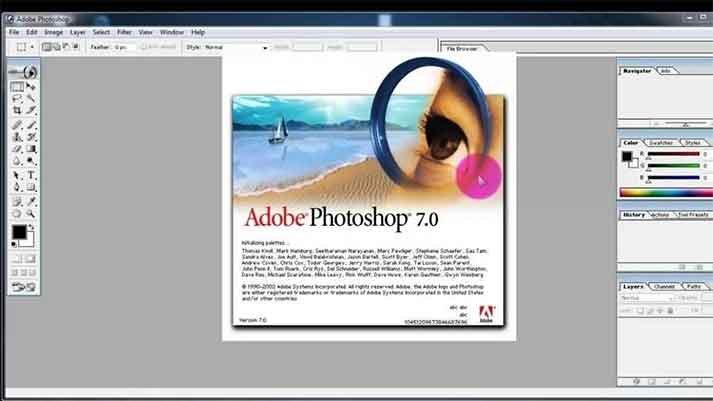
Adobe Photshop
Designing Course
Shri Guru Educations provides simple and practical Photoshop training for students, beginners, and anyone interested in photo editing and design. Our Photoshop course covers basic Photoshop tools, photo editing, photo correction, background removal, layers, text, shapes, colours, photo effects, and basic design work.
The course is designed with simple lessons and practical training, helping learners confidently use Photoshop for editing photos, creating posters, invitations, social media designs, advertisements, and personal needs. Students also get lifetime access to learning resources.
Why Choose this Course?
Why Learn Photoshop Today?
- Make Creative School Projects: Learn to design attractive covers for assignments, science project charts, school magazines, presentations, and other creative projects.
- Stand Out in Competitions: Develop the skills to create eye-catching posters, digital artwork, greeting cards, and creative designs for school events and competitions.
- Create Business & Promotional Designs: Learn to create advertisements, banners, posters, social media posts, and other promotional materials useful for businesses.
- Explore Future Business Opportunities: With practical Photoshop and design skills, learners can explore opportunities to start their own photo editing or graphic design studio in the future.
- Develop Freelancing Skills: Learn skills that can be used to offer photo editing and graphic design services to individuals, businesses, website creators, and digital marketing agencies.
- Build a Foundation for Other Software: Photoshop develops essential image-editing and design skills that can help learners move on to software such as CorelDRAW, Illustrator, PageMaker, and video editing applications.
- Learn Online Design Tools More Easily: Understanding Photoshop concepts such as layers, images, text, backgrounds, and editing can make it easier to learn online design platforms such as Canva.
- Boost Creativity & Hobbies: Learn to edit personal photos, improve images, remove unwanted elements, create photo compositions, and turn creative ideas into digital artwork.
Why Learn Photoshop at Shri Guru Educations?
- Learn on a Computer from Day One: From the first day of the course, learners get hands-on training directly on a computer.
- One-to-One Practical Training: Every learner gets individual attention and guidance while practicing on the computer Photoshop tools and techniques.
- Simple & Easy Learning: Step-by-step training designed especially for beginners , even without prior Photoshop experience.
- Complete Photoshop Training: Learn Photoshop tools, layers, selections, image editing, photo retouching, text effects, backgrounds, and creative designs
- Practical Design Skills: Learn by doing and create real designs such as photo edits, posters, banners, social media graphics, invitations, and other creative materials.
- Suitable for Everyone: Ideal for students, beginners, photographers, designers, business owners, working people, and anyone interested in learning graphic design.
- 100% Practical Lab Training: Practice every topic directly on a computer and work on practical design projects during the course.
- Flexible Batch Timings: Morning, evening, and weekend batches available to suit different learners.
- Affordable Fees: Quality Photoshop training at an affordable fee with convenient payment options.
- Lifetime Learning Resources: Continued access to learning resources even after completing the course.
- Central Location: Conveniently located at KTC Nagar, Tirunelveli, making it easy to attend classes.
Photoshop Course Details
Study Plan
- Photoshop Basics & Workspace
- Selection & Image Editing Tools
- Layers & Layer Management
- Photo Retouching & Image Enhancement
- Text, Shapes & Creative Effects
- Background Removal & Image Compositing
- Poster, Banner & Social Media Design
- Practical Projects & Creative Designs
Photoshop Course Syllabus
Module 1: Introduction to Photoshop 7
- Overview of Photoshop interface and workspace
- Understanding file formats and color modes
- Using essential tools: Move, Marquee, Lasso, Magic Wand, Crop, Eyedropper, Brush, Eraser, and Clone Stamp
- Applying basic adjustments: Brightness/Contrast, Levels, Curves, and Hue/Saturation
Module 2: Selection Tools and Techniques
- Understanding selection basics: Rectangular and Elliptical Marquee, Polygonal Lasso, Magnetic Lasso, and Quick Selection
- Refining selections using Feather, Refine Edge, and Quick Mask
- Masking techniques: Layer Masks and Quick Mask
- Advanced selection techniques: Color Range, Pen Tool, and Channels
Module 3: Layers and Blend Modes
- Working with layers: Creating, duplicating, rearranging, and merging layers
- Applying blend modes for creative effects
- Adjustment layers: Levels, Curves, Hue/Saturation, Color Balance, and Gradient Map
- Layer styles and effects: Drop Shadow, Inner Shadow, Bevel and Emboss, Gradient Overlay, and Stroke
Module 4: Image Editing and Retouching
- Advanced retouching techniques: Spot Healing Brush, Healing Brush, Patch Tool, and Content-Aware Fill
- Removing distractions with Clone Stamp and Content-Aware Move
- Repairing and restoring old or damaged photos
- Working with the Liquefy filter for image manipulation
- Applying filters: Blur, Sharpen, Noise, Distort, and Stylize
Module 5: Text and Typography
- Creating and formatting text layers
- Using character and paragraph settings for typography
- Applying layer effects to text: Drop Shadow, Bevel and Emboss, and Stroke
- Warping and transforming text
- Creating text along paths and shapes
Module 6: Color Adjustments and Image Effects
- Working with color adjustments: Color Balance, Selective Color, Replace Color, and Match Color
- Using adjustment layers for non-destructive editing
- Creating and applying gradients and patterns
- Adding creative effects with filters: Liquefy, Lens Flare, Lighting Effects, and Texture filters
Module 7: Advanced Tools and Techniques
- Utilizing the Pen Tool for precise selections, paths, and shapes
- Working with vector-based shapes and Smart Objects
- Advanced image compositing using layer masks, clipping masks, and blending modes
- Applying advanced filters and plugins for unique effects
- Introduction to automation: Actions and Batch Processing
Module 8: Web Graphics and Exporting
- Designing web graphics: Optimizing images for web, creating buttons, and banners
- Slicing and optimizing images
- Saving for web and export options
- Understanding file formats: JPEG, PNG, GIF, and SVG
Module 9: Print Design and Output
- Setting up documents for print: Resolution, color modes, and bleed
- Working with print-specific features: CMYK color space, color separations, and
- print-ready PDFs
- Preparing images for print: Sharpening, color correction, and file formats
- Troubleshooting common print issues
Who Can Learn this course?
Anyone can learn Photoshop! You do not need previous Photoshop experience or a technical background. The course is designed for beginners who want to learn photo editing, graphic design, and creative digital design skills.
Who Is It For?
- Students & College Students: Learn to createproject covers, posters, presentations, certificates, event designs, and creative artwork.
- Photography Enthusiasts: Learn to edit, enhance, retouch, and improve personal photographs and create creative photo compositions.
- Aspiring Graphic Designers: Build a strong foundation in graphic design, image editing, typography, layouts, and visual creativity.
- Business Owners & Entrepreneurs: Create advertisements, posters, banners, social media graphics, product images, and promotional materials for your business.
- Social Media Content Creators: Design attractive social media posts, thumbnails, promotional graphics, and digital content.
- Freelancers & Future Freelancers: Develop practical skills that can be used to offer photo editing and graphic design servicesto clients.
- Photographers & Photo Studio Beginners: Learn essential skills for photo retouching, background editing, colour correction, image enhancement, and creative photo editing.
- Anyone Interested in Creativity: If you enjoy designing, editing photos, or creating digital artwork, Photoshop provides the tools to turn your ideas into visual designs.
- Complete Beginners: No previous Photoshop experience is required. The course starts from the basics and progresses step by step, making it suitable for beginners.
Requirements
- Education: 10th, 12th, degree, or any educational background.
- Previous Photoshop Knowledge: Not required. Photoshop is taught from the basics, step by step.
- Basic Computer Knowledge:Not required. Photoshop is taught from the basics, step by step.
- Learning Interest: Anyone interested in photo editing, graphic design, or creative digital design can join.
Course Benefits
- 100% Practical Training
- One –to- One Guidance
- Life time Learning Resources
- Bilingual Guidance
- Flexible Learning
- 100% Computer Lab Access
- Preparation Practical Design Projects
- Budget-Friendly Fees
About the trainer
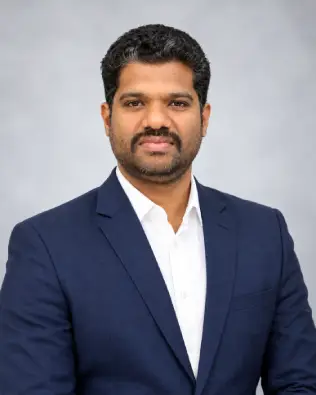
S G PREM ANAND
Founder& Skill Development Professional
I started my training journey in 2014 with a focus on providing simple, practical, and easy-to-understand learning.
Over the years, I have helped students, graduates, job seekers, and working professionals develop practical skills that support their education, work, and career growth.
My teaching approach focuses on practical training, step-by-step learning, and real-world examples. I believe students learn better when they understand concepts clearly and get enough opportunity to practise what they learn.
Our goal is to provide quality, practical training that helps learners build useful skills, confidence, and knowledge for their career and professional development.